Best Mobile Crypto Wallets in 2026
What makes a mobile wallet different from «a wallet on your phone»
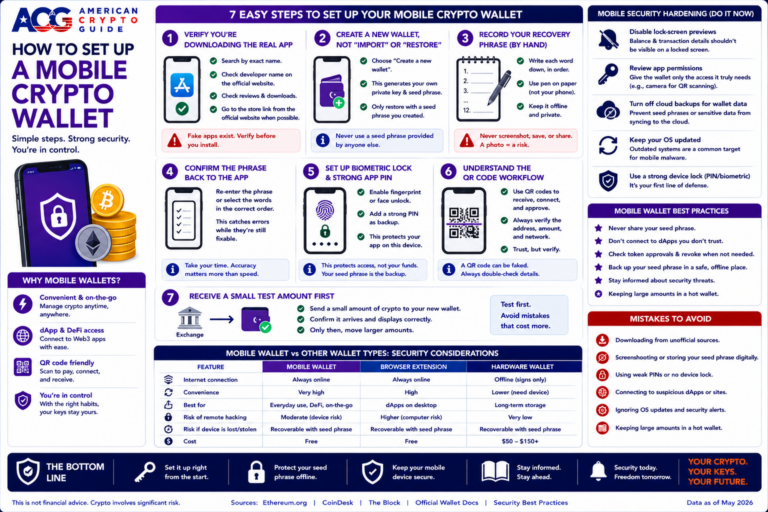
Plenty of wallets simply have a mobile app version. A genuinely good mobile crypto wallet is designed around what phones do well — biometric unlock, camera-based QR scanning, push notifications, one-tap dApp connections — rather than just shrinking a desktop interface down to fit a smaller screen. That distinction matters more than it sounds: a wallet built mobile-first tends to handle everyday spending and quick dApp interactions far more smoothly than one that’s mobile as an afterthought.
The quick comparison table
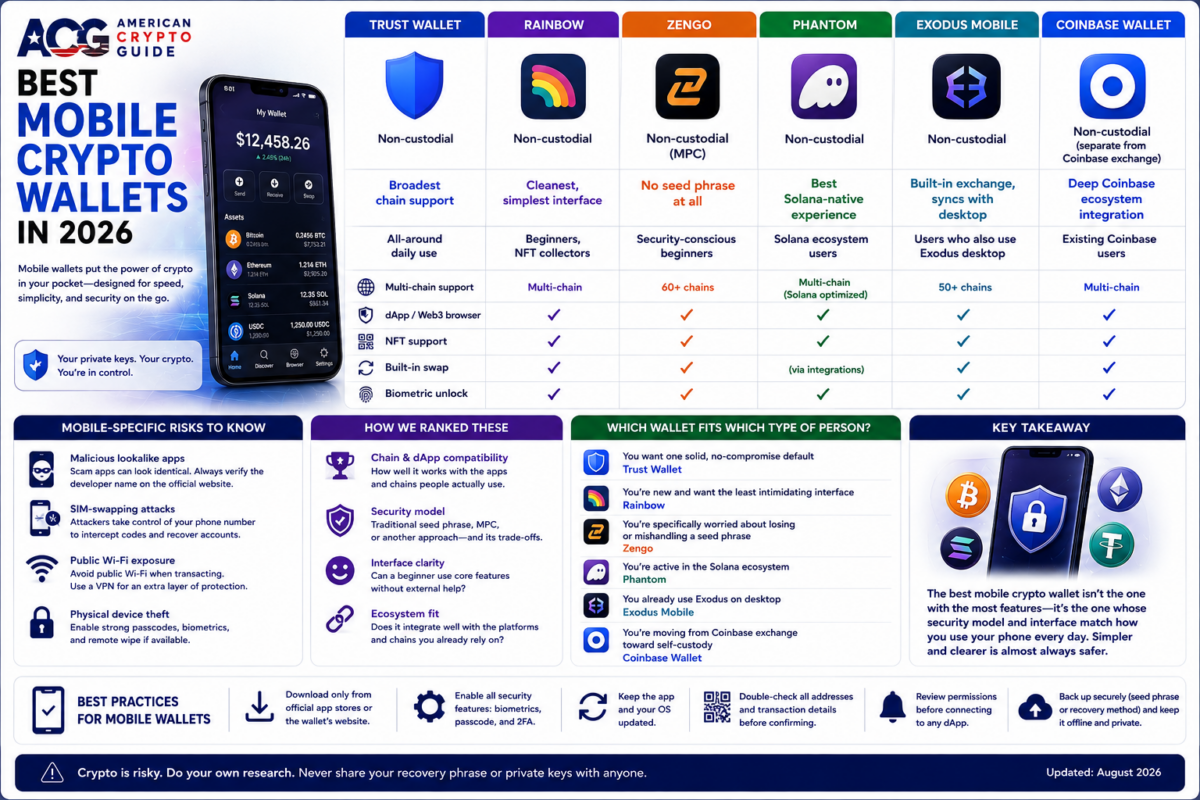
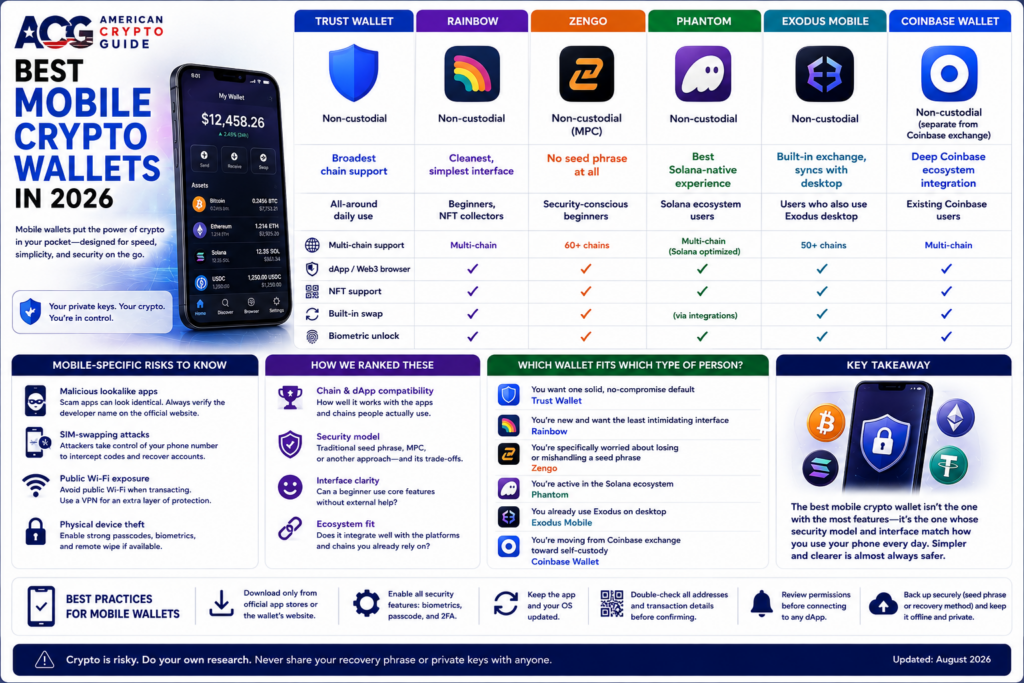
| Wallet | Custody | Standout feature | Best for |
|---|---|---|---|
| Trust Wallet | Non-custodial | Broadest chain support | All-around daily use |
| Rainbow | Non-custodial | Cleanest, simplest interface | Beginners, NFT collectors |
| Zengo | Non-custodial (MPC) | No seed phrase at all | Security-conscious beginners |
| Phantom | Non-custodial | Best Solana-native experience | Solana ecosystem users |
| Exodus Mobile | Non-custodial | Built-in exchange, syncs with desktop | Users who also use Exodus desktop |
| Coinbase Wallet | Non-custodial (separate from Coinbase exchange) | Deep Coinbase ecosystem integration | Existing Coinbase users |
Best all-around: Trust Wallet
Trust Wallet, owned by Binance, supports an unusually wide range of blockchains from a single app and includes a built-in Web3 browser for connecting directly to decentralized apps without leaving the wallet. It’s a solid default choice specifically because it doesn’t specialize narrowly — it’s genuinely competent across chains, dApp use, and simple holding, without forcing trade-offs most users will notice.
Best for simple design: Rainbow
Rainbow was built specifically to feel less intimidating than the average crypto app, with a clean interface that puts NFT display and everyday transactions front and center rather than burying them under technical settings. It’s a strong pick for beginners who found other wallets’ interfaces overwhelming, and for anyone whose primary use case is viewing and managing NFT collections on mobile.
Best keyless security: Zengo
Zengo takes a fundamentally different security approach: instead of a traditional seed phrase, it uses multi-party computation (MPC), splitting the cryptographic responsibility for your account between your device and Zengo’s servers, with neither half alone sufficient to access funds. In practice, this means there’s no single seed phrase that can be lost, photographed, or phished the way a traditional 12-word backup can — a genuinely different risk model rather than just a convenience feature, detailed in Zengo’s own security documentation at https://zengo.com/security.
Worth understanding, not just noting: MPC-based wallets remove the seed phrase failure mode specifically, not risk in general. Account recovery, device loss procedures, and provider trust become the relevant risk factors instead — a trade of one set of risks for a different one, not a strictly safer wallet in every dimension.
Best for Solana ecosystem: Phantom
Originally built specifically for Solana, Phantom has expanded to support additional chains but remains the most polished choice for anyone primarily active in the Solana ecosystem — fast transaction confirmations, native NFT support, and deep integration with Solana-based decentralized apps. Its interface reflects that origin: streamlined for speed and frequent on-chain activity rather than treating every chain identically.
📬Did you like this article?
Subscribe and receive our posts directly in your inbox. Free!
Sin spam. Puedes darte de baja cuando quieras.
Best multi-chain veteran: Exodus Mobile
Exodus’s mobile app mirrors its long-running desktop wallet, syncing across devices and supporting dozens of assets with a built-in swap feature for exchanging between them directly in the app. For users who already use Exodus on desktop, the mobile app extends that same experience without requiring a separate mental model — a genuine convenience for anyone managing crypto across multiple devices.
Best for beginners already on an exchange: Coinbase Wallet
Coinbase Wallet is a separate, non-custodial app from the main Coinbase exchange account, but its familiarity to existing Coinbase users lowers the learning curve considerably. It connects smoothly with the broader Coinbase ecosystem while still giving users control of their own private keys — a reasonable bridge for someone stepping from a custodial exchange account into self-custody for the first time.
Mobile-specific risks worth knowing
Mobile wallets face a set of risks that desktop and hardware wallets don’t share to the same degree:
- Malicious lookalike apps in official app stores, mimicking a legitimate wallet’s name and icon closely enough to fool a quick glance — always verify the developer name against the wallet’s official site, such as https://trustwallet.com, before installing.
- SIM-swapping attacks, where an attacker takes control of your phone number to intercept SMS-based account recovery or two-factor codes.
- Public Wi-Fi exposure during transactions, though this risk is meaningfully reduced by wallets that use end-to-end encrypted communication rather than relying on network-level trust.
- Physical device theft, which is a more immediate concern for a phone carried daily than for a hardware wallet stored securely at home.
How we ranked these
- Chain and dApp compatibility — how smoothly does it actually connect to the apps people use?
- Security model — traditional seed phrase, MPC, or another approach, and how well-understood are its trade-offs?
- Interface clarity — can a genuine beginner use core features without external guidance?
- Ecosystem fit — does it integrate well with the specific chains or platforms the user already relies on?
Which mobile wallet fits which type of person
- You want one solid, no-compromise default: Trust Wallet.
- You’re new and want the least intimidating interface: Rainbow.
- You’re specifically worried about losing or mishandling a seed phrase: Zengo.
- You’re active in the Solana ecosystem: Phantom.
- You already use Exodus on desktop: Exodus Mobile.
- You’re moving from Coinbase’s exchange toward self-custody: Coinbase Wallet.
Final thoughts
The best mobile crypto wallet isn’t necessarily the one with the most features — it’s the one whose security model and interface actually match how you use your phone day to day. A wallet you find confusing enough to avoid double-checking transaction details is a worse security choice than a simpler one you actually understand, regardless of which one has the longer feature list.