How to Create a Kraken Account: Step-by-Step

Before you start: what makes Kraken’s signup different
Kraken’s account creation process shares the basic shape of any regulated exchange signup — email, verification, identity documents — but it’s built around a distinctive tiered verification system, where the amount of information required scales directly with how much you want to deposit, withdraw, and trade. Understanding this tiered structure before you begin helps you choose the right starting point rather than over- or under-verifying relative to your actual needs.
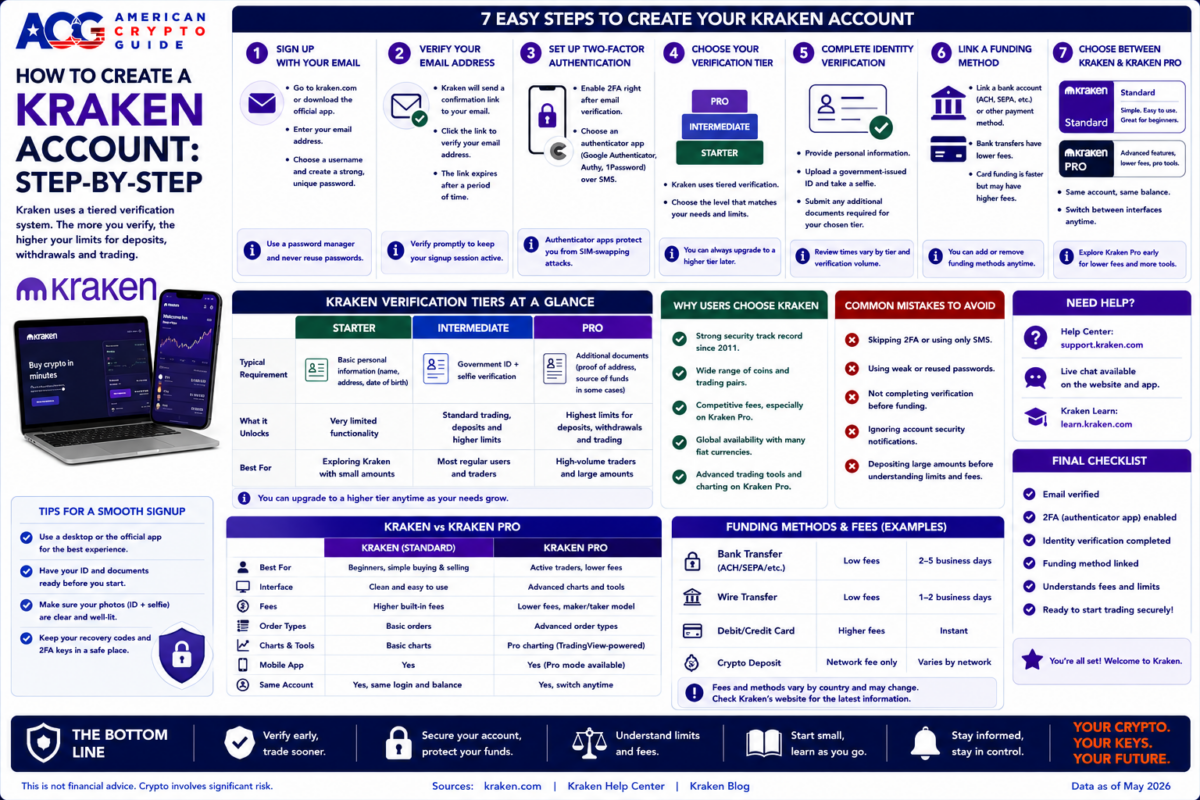
Step 1: Sign up with your email
Visit Kraken’s official website or download the official app, and select the option to register. You’ll provide an email address, choose a username, and set a password — ideally a unique one generated and stored through a password manager rather than reused from another account.
Step 2: Verify your email address
Kraken sends a confirmation link to the email you registered with. This step must be completed before proceeding further, and the link typically has an expiration window, so complete it promptly after signing up.
Step 3: Set up two-factor authentication early
Kraken strongly encourages enabling two-factor authentication immediately after email verification, offering authenticator app support alongside other options. Choose an authenticator app over SMS-based verification whenever possible, since SMS carries a meaningful vulnerability to SIM-swapping attacks that app-based codes don’t share.
Worth doing at this exact point in signup, not later: Kraken, like most exchanges, makes two-factor authentication genuinely easy to enable during initial account creation. Completing it now, while you’re already in the setup flow, is far more reliable than planning to «come back and do it later.»
Step 4: Choose your verification tier
This is where Kraken’s process diverges most clearly from many competitors. Kraken uses several verification levels, each unlocking progressively higher deposit, withdrawal, and trading limits in exchange for additional documentation.
Starter tier
Requires basic information — name, address, date of birth — and unlocks limited functionality, sufficient for very small-scale exploration but not full trading access in most cases.
Intermediate tier
Requires government ID verification and typically unlocks meaningfully higher limits, sufficient for most individual users’ regular trading and withdrawal needs.
Pro tier
Requires additional documentation, sometimes including proof of address or source of funds information, unlocking the highest available limits — relevant mainly for high-volume traders or those moving larger sums regularly.
Step 5: Complete identity verification for your chosen tier
Once you’ve selected a target tier, Kraken guides you through the specific documentation required — typically a government-issued photo ID, a selfie for identity matching, and, at higher tiers, proof of address such as a recent utility bill or bank statement. Processing times vary by tier and current verification volume, with Starter and Intermediate tiers generally processing faster than Pro-level requests requiring more manual review.
📬Did you like this article?
Subscribe and receive our posts directly in your inbox. Free!
Sin spam. Puedes darte de baja cuando quieras.
Step 6: Link a funding method
With verification complete for your chosen tier, link a bank account or other supported payment method to actually fund the account. Bank transfers are typically the lowest-fee option; card-based funding, where available, usually carries a higher fee in exchange for faster processing.
Step 7: Choose between Kraken and Kraken Pro
Once your account is active, Kraken offers two distinct trading interfaces drawing from the same account: the standard Kraken interface, simpler and aimed at straightforward buying and selling, and Kraken Pro, a more advanced interface with a clearer, generally lower fee schedule and deeper charting tools. Both use the same login and underlying balance — switching between them doesn’t require any additional signup. For anyone planning to use Kraken beyond a single occasional purchase, familiarizing yourself with Kraken Pro’s interface early is worth the modest learning curve, given the fee difference.
Kraken’s verification tiers at a glance
| Tier | Typical requirement | What it generally unlocks |
|---|---|---|
| Starter | Basic personal information | Very limited functionality |
| Intermediate | Government ID + selfie verification | Standard trading and higher limits |
| Pro | Additional documentation (proof of address, source of funds in some cases) | Highest available limits |
Exact requirements and limits vary by country and can change over time, so checking Kraken’s own current documentation for your specific region during signup is more reliable than relying on a fixed figure.
Common signup issues and how to fix them
- Verification stuck at Starter tier longer than expected when Intermediate was selected: double-check that all required documents were actually submitted in the correct format — a partially completed submission sometimes silently fails to advance rather than throwing a clear error.
- ID photo rejected repeatedly: ensure the entire document is visible, including all four corners, with even lighting and no glare — a frequent, easily fixed cause of rejection.
- Funding method not linking successfully: some banks flag crypto-related transactions by default; contacting your bank to confirm the transaction type is permitted, or trying an alternative funding method, typically resolves this.
- Selfie verification failing: remove glasses, hats, or anything else that might obscure facial features, and ensure adequate lighting directly on your face rather than backlighting.
Security settings worth enabling right after signup
- Switch to an authenticator app for two-factor authentication if you initially set up SMS-based verification.
- Enable a hardware security key, if you own one, as Kraken supports this as an additional, stronger two-factor option for account login and withdrawals.
- Set up Kraken’s global settings lock, a feature that adds a time delay before certain account settings (like disabling two-factor authentication) can be changed — a meaningful protection against an attacker who’s gained partial account access attempting to weaken your security settings further.
- Whitelist withdrawal addresses, if you have wallets you regularly withdraw to, adding a layer of protection against withdrawals to an unfamiliar address in the event of account compromise.
- Bookmark Kraken’s official URL directly, avoiding navigation through search results, which are occasionally targeted by fraudulent lookalike ads mimicking the real site.
Why the tiered approach can actually work in your favor
Unlike an all-or-nothing verification process, Kraken’s tiered system lets you match verification effort to your actual intended use. Someone testing the platform with a small amount doesn’t need to submit proof-of-address documentation immediately — they can start at a lower tier and upgrade later if their needs grow, rather than front-loading all possible verification before knowing whether they’ll actually use the platform regularly. This is worth keeping in mind if the idea of extensive upfront documentation feels like a barrier: starting at Intermediate, sufficient for most individual users, is a reasonable middle ground rather than defaulting immediately to the most demanding tier.
Upgrading your tier later without starting over
A useful detail many new users don’t realize until they need it: moving from a lower tier to a higher one later doesn’t require restarting the entire signup process. Kraken retains the information and documentation already submitted, and upgrading typically just means providing whatever additional documentation the higher tier requires on top of what’s already on file. This means there’s little downside to starting conservatively at Intermediate rather than immediately attempting Pro-level verification — if your trading volume or withdrawal needs grow later, the upgrade path is designed to be incremental rather than forcing a fresh start from scratch.
Kraken’s own official support documentation for account verification is maintained at https://support.kraken.com, worth checking directly for current, region-specific requirements before starting the process, since exact documentation needs can vary and change over time.
Verifying you’re actually on Kraken’s official site or app
Given how frequently exchange signups are targeted by phishing attempts, it’s worth being deliberate about this before entering any personal information. Type Kraken’s URL directly into your browser rather than clicking a link from an email, social media post, or search advertisement, and confirm the domain matches exactly — phishing sites frequently use near-identical domains with subtle misspellings designed to be missed at a glance. For mobile, download only through your device’s official app store, checking that the listed developer matches Kraken’s official name rather than a similarly named impersonator. This single habit, applied consistently from the very first step of signup, closes off one of the more common ways new users end up entering sensitive information into a fraudulent platform before a legitimate account even exists.
How long the process typically takes from start to finish
For most applicants pursuing Intermediate-tier verification with straightforward documentation, the entire process — from initial signup through completed identity verification — generally takes somewhere between 15 and 40 minutes of active effort, with automated review sometimes completing within minutes and occasionally taking longer during periods of high verification volume. Pro-tier verification, given its additional documentation requirements, typically takes longer and may involve more manual review. It’s generally worth completing your target tier’s requirements in one sitting rather than starting and returning much later, since picking the process back up after an extended gap occasionally requires re-confirming information that had already been submitted.
Creating a Kraken account follows the same general shape as any regulated exchange signup, but its distinctive tiered verification system means your first real decision isn’t just «sign up» — it’s choosing how much verification effort matches your actual intended use from the start. Getting that choice right, alongside enabling strong two-factor authentication from the very beginning, sets up an account that’s both appropriately verified for your needs and genuinely secure from day one.