How to Create a Gemini Account

Before you start: what to expect from a compliance-first platform
Gemini has built its entire reputation around regulatory rigor, and that shows up in its account creation process too — verification here tends to be thorough, reflecting the same New York State Trust Charter oversight that defines the platform more broadly. This isn’t a drawback so much as a direct consequence of the trust-focused positioning that distinguishes Gemini from more loosely regulated competitors, and knowing this going in helps set realistic expectations for how much documentation and review the process might involve.
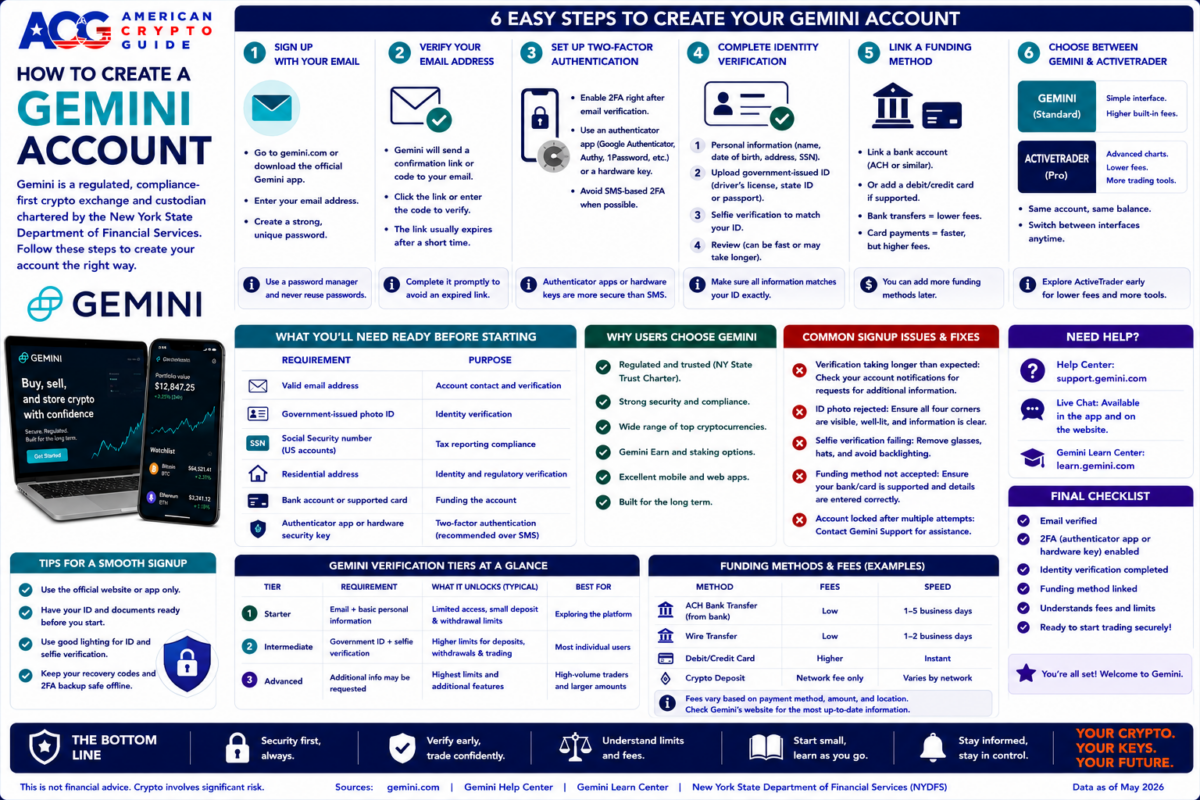
Step 1: Sign up with your email
Visit Gemini’s official website or download the official app, and select the option to create an account. You’ll provide an email address and set a password — ideally one generated and stored through a password manager, unique to this account rather than reused elsewhere.
Step 2: Verify your email address
Gemini sends a confirmation link or code to complete this step. As with any exchange signup, complete it promptly, since verification links typically expire after a limited window.
Step 3: Set up two-factor authentication
Gemini strongly encourages — and in practice functionally requires for meaningful account use — two-factor authentication early in the signup flow, supporting authenticator apps and hardware security keys alongside SMS-based options. Choose an authenticator app or hardware key over SMS whenever the option is presented, since SMS-based codes remain vulnerable to SIM-swapping attacks that these alternatives don’t share.
Worth taking seriously given Gemini’s specific positioning: a platform that markets itself on security and compliance credentials is precisely the kind of account where skipping the strongest available two-factor option undermines the very reason you might have chosen it in the first place.
Step 4: Complete identity verification
Gemini’s identity verification process is comprehensive, consistent with its regulatory structure:
- Personal information — full legal name, date of birth, residential address, and Social Security number (for US-based accounts, required for tax reporting compliance).
- Government-issued ID upload — a driver’s license, state ID, or passport, following the app’s guided capture process.
- Selfie verification — matching your live image against the submitted ID.
- Review, which can be faster for straightforward applications but may take longer given Gemini’s generally more thorough compliance checks compared to some competitors.
Step 5: Link a funding method
With verification complete, link a bank account or supported card to fund your account. Bank transfers typically carry the lowest fees; card-based funding, where available, is usually faster but costs more per transaction.
Step 6: Choose between Gemini and Gemini ActiveTrader
Once active, your account can access two distinct interfaces: the standard Gemini app, simpler but with higher built-in fees similar in pattern to other exchanges’ beginner-facing apps, and Gemini ActiveTrader, a separate interface with a clearer, lower fee schedule and more advanced charting tools. Both draw from the same account and balance. For anyone planning regular use beyond an occasional purchase, exploring ActiveTrader early is worth the modest learning curve, given the meaningful fee difference between the two.
📬Did you like this article?
Subscribe and receive our posts directly in your inbox. Free!
Sin spam. Puedes darte de baja cuando quieras.
What you’ll typically need ready before starting
| Requirement | Purpose |
|---|---|
| Valid email address | Account contact and verification |
| Government-issued photo ID | Identity verification |
| Social Security number (US accounts) | Tax reporting compliance |
| Residential address | Identity and regulatory verification |
| Bank account or supported card | Funding the account |
| Authenticator app or hardware security key | Two-factor authentication (recommended over SMS) |
Common signup issues and how to fix them
- Verification taking longer than expected: given Gemini’s more thorough compliance review process, some delay beyond what other exchanges might take is not unusual — checking your account’s notification center for any specific request for additional information is the most direct way to identify what’s causing a hold-up.
- ID photo rejected: ensure the full document is visible with all four corners in frame, in even lighting without glare, and that the information is clearly legible.
- Selfie verification failing repeatedly: remove glasses, hats, or anything obscuring facial features, and use direct, even lighting rather than backlighting.
- Funding method declined: some banks flag crypto-related transactions by default; confirming the transaction type with your bank, or trying an alternative funding method, typically resolves this.
- Confusion about which interface to use: remember that both Gemini and Gemini ActiveTrader use the same account — there’s no need to sign up separately or worry about losing access to funds by switching between them.
Security settings worth enabling immediately after signup
- Use a hardware security key for two-factor authentication if you own one, since Gemini supports this as its strongest available option, consistent with the platform’s broader security-focused positioning.
- Set up account activity notifications, ensuring you’re alerted promptly to logins, withdrawals, or setting changes you didn’t personally initiate.
- Review Gemini’s published security and compliance documentation, since the company is unusually transparent about its SOC 1 and SOC 2 audit results — understanding what those audits actually cover gives you a clearer picture of what the platform’s security claims are actually backed by.
- Bookmark the official Gemini URL directly, avoiding navigation through search results, which are occasionally targeted by fraudulent lookalike advertisements.
- Use a unique, strong password confirmed through a password manager rather than reused from another service.
Why Gemini’s verification process reflects its broader business model
It’s worth connecting this signup experience back to Gemini’s core positioning as a platform: the company built its business specifically around demonstrable regulatory compliance, including a New York State Trust Charter that subjects it to oversight beyond standard money transmitter licensing. A more rigorous account verification process is a direct, logical consequence of that structure — the same regulatory framework that requires Gemini to maintain stronger compliance infrastructure also requires more thorough identity verification at the account level. Understanding this connection helps frame any extra signup friction not as an inconvenience unique to Gemini, but as the visible part of the same regulatory rigor the platform markets as a core differentiator.
How long the process typically takes
For most applicants submitting clear, consistent documentation, the entire process — from initial signup through completed identity verification — generally takes somewhere between 20 and 45 minutes of active effort, with the automated portion of review often completing within a similar window, though it can extend further if manual compliance review is triggered. Given Gemini’s generally more thorough verification standards compared to some competitors, it’s reasonable to expect the review step specifically to take somewhat longer on average, and building that expectation in from the start avoids unnecessary concern if the process doesn’t complete instantly.
Verifying you’re on Gemini’s genuine platform
As with any exchange signup, it’s worth confirming you’re on the real Gemini website or app before entering any personal information. Type the URL directly rather than clicking a link from an email, social media post, or search advertisement, and confirm the domain matches exactly, since fraudulent lookalike domains are a persistent risk across the industry. For mobile, download only through your device’s official app store, checking that the listed developer matches Gemini’s official name precisely rather than a similarly named impersonator.
Gemini’s own official support documentation for account verification is maintained at https://support.gemini.com, worth checking directly for current, region-specific requirements, since exact documentation needs and processing times can change.
What happens if verification requires additional documentation
Occasionally, Gemini’s compliance review flags an application for additional documentation beyond the standard set — this might include proof of address, clarification of employment or income information, or further identity confirmation. This isn’t necessarily a sign anything went wrong; it’s a standard part of how a compliance-focused platform handles applications that don’t perfectly match its automated verification criteria on the first pass. Responding promptly and completely to any such request, through the account’s official notification or messaging system rather than any external channel claiming to represent Gemini, is the fastest path to resolution. Treating this step as routine rather than alarming helps avoid unnecessary frustration with a process that, while sometimes slower than competitors, exists specifically to maintain the compliance standards that differentiate the platform.
Final thoughts
Creating a Gemini account follows the familiar shape of regulated exchange signups — email verification, identity documentation, funding setup — but tends to involve a somewhat more thorough compliance review than some competitors, a direct reflection of the trust-charter regulatory structure that defines the platform’s broader identity. Approaching the process with that expectation, and taking the two-factor authentication and interface choice seriously from the start, sets up an account well-suited to Gemini’s particular strengths. For anyone who specifically chose Gemini because of its compliance credentials, the extra verification effort at signup is really just the first, most visible example of the same rigor showing up everywhere else in how the platform operates. That consistency, more than any single feature, is the real reason to expect a somewhat different signup experience here than elsewhere — and, for the right kind of user, the real reason to choose Gemini in the first place.