How to Create a Binance US Account
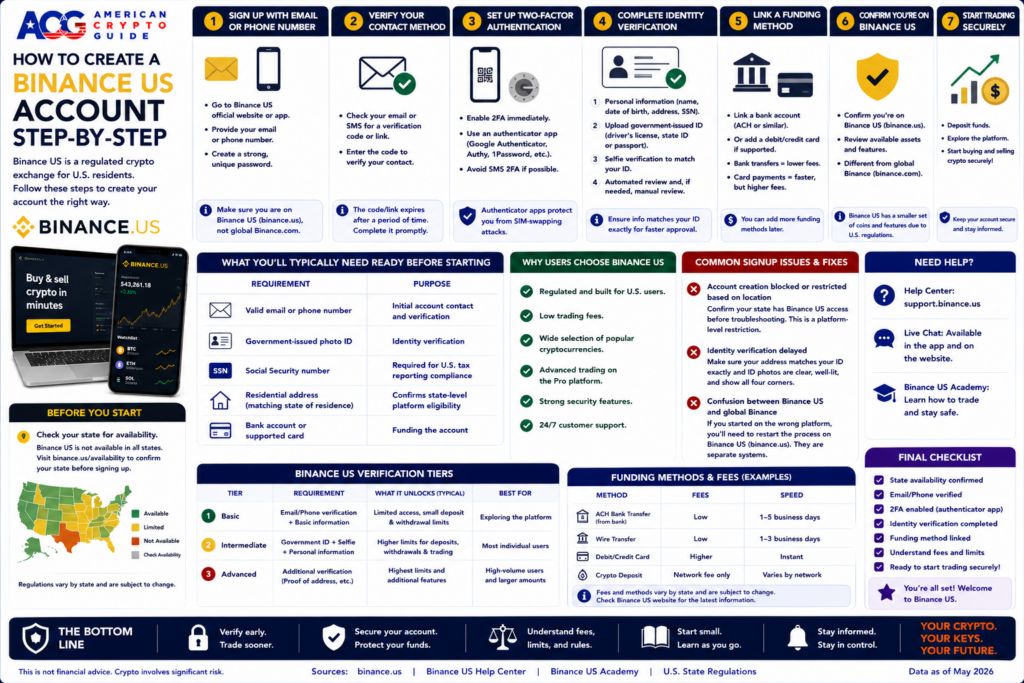
Before you start: the state availability check unique to Binance US
Before beginning signup, there’s a step specific to Binance US that doesn’t apply to most other exchanges: confirming your state actually has access to the platform. Because Binance US operates under US state-by-state regulatory requirements, availability and feature access can vary by location, and some states have historically had limited or no access. Checking current state availability directly through Binance US’s own site before investing time in the signup process avoids the frustration of completing several steps only to discover a restriction partway through.
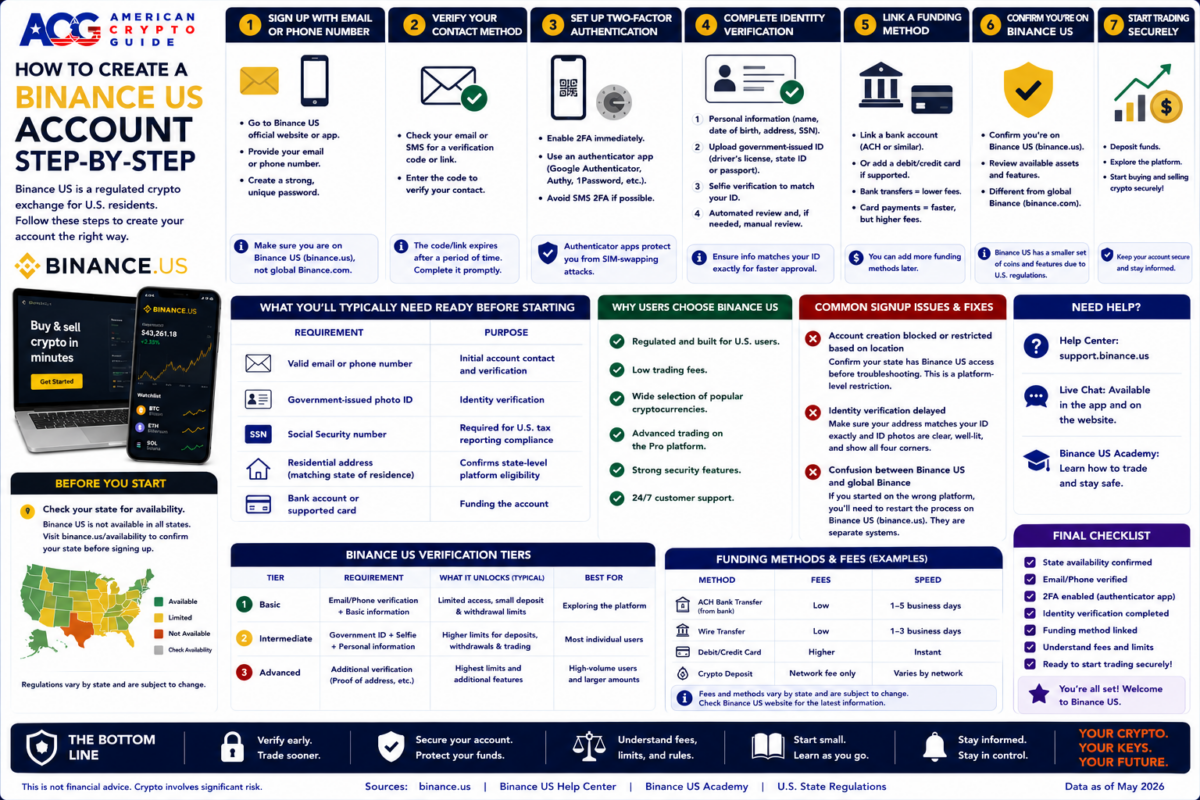
Step 1: Sign up with your email or phone number
Navigate to Binance US’s official website or download the official app — being careful to confirm you’re on the US-specific platform, not global Binance.com, which is a legally separate service with a different signup process and different feature availability. Provide an email address or phone number and create a password, ideally unique to this account and generated through a password manager rather than reused elsewhere.
Worth double-checking immediately at this step: typing «Binance» into a search engine sometimes surfaces the global platform first, depending on your location and search history. Confirm the URL specifically shows the US-designated domain before entering any information.
Step 2: Verify your contact method
Complete the verification code or link sent to your email or phone. This step confirms you have access to the contact information provided and must be completed before the account setup can continue.
Step 3: Set up two-factor authentication
Binance US strongly recommends enabling two-factor authentication immediately after initial contact verification, typically supporting authenticator app-based codes in addition to other options. Prioritize an authenticator app over SMS-based verification, since SMS-based codes remain vulnerable to SIM-swapping attacks in a way app-based codes are not.
Step 4: Complete identity verification
As a regulated US platform, Binance US requires standard identity verification before unlocking full account functionality:
- Personal information — legal name, date of birth, residential address, and Social Security number (required for US tax reporting compliance).
- Government-issued ID upload — typically a driver’s license, state ID, or passport, following the app’s guided capture process.
- Selfie verification — comparing your live image against the submitted ID to confirm identity.
- Automated and, if needed, manual review, which is often fast for straightforward applications but can take longer if additional verification is triggered.
Step 5: Link a funding method
Once verified, link a bank account or supported payment method to fund your account. Bank transfers (via ACH or similar) typically carry the lowest fees; card-based funding, where supported, is often faster but comes with a higher fee.
Step 6: Confirm your account reflects Binance US, not global Binance
Once your account is active, take a moment to confirm the interface, supported assets, and available features match what Binance US actually offers — a narrower set than global Binance, due to US regulatory constraints. This isn’t a mistake to fix so much as a useful confirmation that you’re using the correct, legally compliant platform for US residents rather than having somehow ended up on international infrastructure not intended for US users.
📬Did you like this article?
Subscribe and receive our posts directly in your inbox. Free!
Sin spam. Puedes darte de baja cuando quieras.
What you’ll typically need ready before starting
| Requirement | Purpose |
|---|---|
| Valid email or phone number | Initial account contact and verification |
| Government-issued photo ID | Identity verification |
| Social Security number | Required for US tax reporting compliance |
| Residential address (matching state of residence) | Confirms state-level platform eligibility |
| Bank account or supported card | Funding the account |
Common signup issues and how to fix them
- Account creation blocked or restricted based on location: confirm your state currently has Binance US access before troubleshooting further — this is a platform-level restriction, not typically a fixable account error.
- Identity verification delayed: ensure your submitted address matches your ID exactly, and that ID photos are clear, well-lit, and show all four corners of the document.
- Confusion between Binance US and global Binance during signup: if you’ve accidentally started creating an account on the wrong platform, you’ll generally need to restart the process specifically through Binance US’s own site or app, since the two are separate systems with separate account bases.
- Funding method declined: some banks flag crypto-related transactions by default; contacting your bank to confirm the transaction type is permitted, or trying an alternative funding method, typically resolves this.
- Selfie verification failing repeatedly: remove glasses or anything else obscuring your face, and ensure even, direct lighting rather than backlighting.
Security settings worth enabling immediately after signup
- Switch to an authenticator app for two-factor authentication if you initially set up SMS-based verification during signup.
- Set up anti-phishing code features, if available, which display a personalized code in official platform emails, helping you distinguish genuine communications from phishing attempts using the same look and branding.
- Enable withdrawal address whitelisting, if you have wallets you regularly withdraw to, limiting withdrawals to pre-approved addresses as an added layer of protection.
- Use a unique, strong password confirmed through a password manager rather than one reused from another account.
- Bookmark the official Binance US URL directly, rather than relying on search results, which can occasionally surface fraudulent lookalike sites through paid advertising.
Why the state-by-state consideration matters more here than elsewhere
Most major US exchanges operate nationally with relatively uniform availability, making Binance US’s state-dependent access somewhat unusual in the current landscape. This stems directly from the platform’s regulatory history and the state-by-state nature of money transmitter licensing in the US more broadly — some platforms pursue licensing in every state, while others prioritize certain states first. Checking current availability isn’t a one-time consideration either; it’s worth periodically reconfirming if you’ve moved, since your state’s licensing status with any specific platform can change over time as regulatory relationships evolve.
How long the process typically takes
For most applicants with straightforward documentation living in a state with full platform access, the entire signup process — from initial registration through completed identity verification — typically takes somewhere between 15 and 30 minutes of active effort, with automated review often completing within minutes, though it can extend longer during periods of higher verification volume or if additional manual checks are triggered. It’s generally worth completing the process in one sitting rather than starting and returning after a long gap, since resuming a partially completed application sometimes requires re-confirming details that had already been submitted.
What to do if your state has limited or no access
If you discover during the state availability check that your state has restricted or unavailable access to Binance US, the practical options are straightforward: consider one of the other major regulated exchanges with broader national availability, or check periodically for updates to your state’s status, since platform licensing arrangements do change over time as companies expand their regulatory footprint. There’s no workaround involving misrepresenting your state of residence that’s advisable — doing so would violate the platform’s terms of service and could create genuine complications with account verification, tax reporting, or future access, well beyond the inconvenience of simply choosing a different, fully available platform in the meantime.
Binance US’s own official support documentation for account verification and state availability is maintained at https://www.binance.us/support, worth checking directly before and during signup, since exact requirements and availability can change.
Verifying you’re on the genuine platform before entering any information
Given how frequently exchange signups are targeted by phishing attempts, it’s worth being explicit about this before you begin. Type the Binance US URL directly into your browser rather than clicking a link from an email, social media post, or search advertisement, and confirm the domain matches exactly — fraudulent lookalike domains often use subtle misspellings or extra characters designed to be missed at a quick glance. For mobile, download only through your device’s official app store, checking that the listed developer matches Binance US’s official name precisely. This habit, applied consistently from the very first step, closes off one of the more common ways new users end up entering sensitive personal and financial information into a fraudulent platform before a legitimate account even exists.
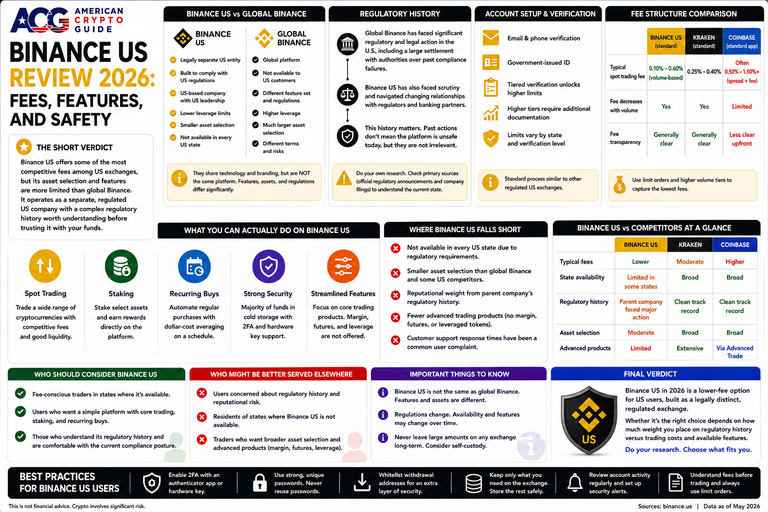
Creating a Binance US account follows a broadly familiar pattern shared with other regulated US exchanges, but two considerations are genuinely specific to this platform: confirming state-level availability before investing time in signup, and being deliberate about distinguishing the US-specific platform from the separate global Binance service. Getting both of these right at the start, alongside enabling strong two-factor authentication from day one, sets up an account that’s both correctly configured and appropriately secured. Taking the extra few minutes to verify each of these details up front avoids the more common frustrations new users run into with this particular platform, and leaves you with an account that’s ready for whatever level of trading activity you actually intend to use it for, without needing to revisit the basics later.