Crypto Security Checklist for Beginners

Why a checklist beats a single «big» security tip
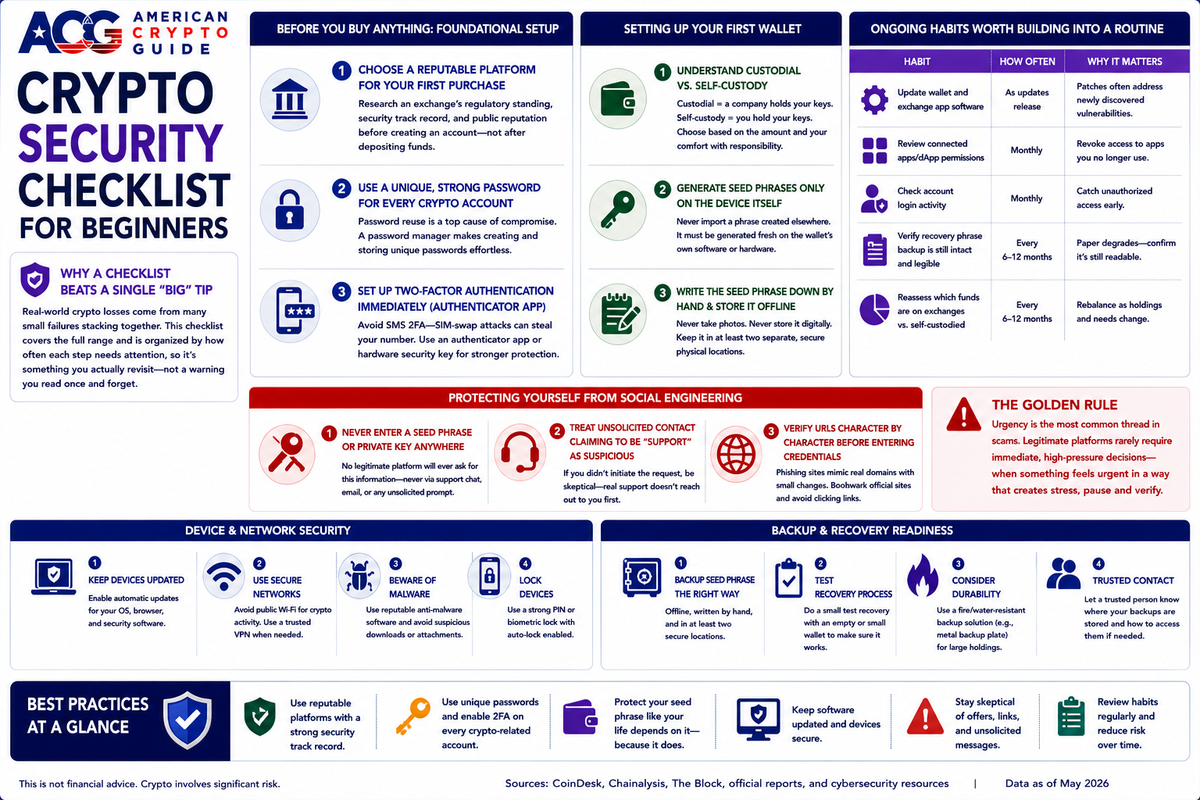
Most crypto security advice gets condensed into one dramatic warning — «never share your seed phrase» — which is true and important, but incomplete. Real-world crypto losses come from a wider range of smaller failures stacking together: a reused password, a skipped software update, an unverified download source. This checklist covers the full range deliberately, organized by how often each step needs attention, so it functions as something you actually revisit rather than a one-time warning you read once and forget.
Before you buy anything: foundational setup
Choose a reputable platform for your first purchase
Research an exchange’s regulatory standing, security track record, and public reputation before creating an account — not after depositing funds. A platform’s history of handling (or failing to handle) past incidents is one of the most reliable signals available, far more useful than marketing claims alone.
Use a unique, strong password for every crypto-related account
Password reuse across accounts is one of the most common paths to compromise — if one unrelated service you use gets breached and that password leaks, any other account sharing it becomes vulnerable too. A dedicated password manager makes generating and storing unique passwords for every account practically effortless.
Set up two-factor authentication immediately, using an authenticator app rather than SMS
SMS-based two-factor authentication is vulnerable to SIM-swapping attacks, where an attacker convinces a mobile carrier to transfer your phone number to a device they control. Authenticator apps (or hardware security keys, for even stronger protection) don’t share this specific vulnerability, since they’re not tied to your phone number at all.
Setting up your first wallet
Understand the difference between custodial and self-custody before choosing
A custodial wallet (like funds held on an exchange) means a company manages your keys; a self-custody wallet means you do. Neither is universally correct — the right choice depends on the amount involved and your comfort with the added responsibility of self-custody.
Generate seed phrases only on the device itself, never import one created elsewhere
A private key or seed phrase generated on any internet-connected device before being moved to a wallet has already been exposed to that device’s potential vulnerabilities. Legitimate wallet setup always generates the phrase fresh, on the wallet’s own software or hardware.
Write the seed phrase down by hand and store it offline, in more than one secure location
This bears repeating because it’s genuinely the single most consequential habit in all of self-custody: no photos, no cloud notes, no password manager entries — physical, offline, and backed up in at least two separate secure places.
Ongoing habits worth building into a routine
| Habit | How often | Why it matters |
|---|---|---|
| Update wallet and exchange app software | As updates release | Patches often address newly discovered vulnerabilities |
| Review connected apps/dApp permissions | Monthly | Revoke access to apps you no longer use |
| Check account login activity | Monthly | Catch unauthorized access early |
| Verify recovery phrase backup is still intact and legible | Every 6-12 months | Paper degrades; confirm it’s still readable |
| Reassess which funds are on exchanges vs. self-custodied | Every 6-12 months | Rebalance as holdings and needs change |
Protecting yourself from social engineering
Never enter a seed phrase or private key into any website, app, or message
The overwhelming majority of crypto theft today happens through convincing someone to voluntarily hand over access — not through breaking encryption. No legitimate platform will ever ask for this information through support chat, email, or any unsolicited prompt.
Treat unsolicited contact claiming to be «support» as inherently suspicious
If you didn’t initiate a support request yourself, any message claiming to be from an exchange or wallet’s support team reaching out first should be treated with default suspicion, regardless of how official it appears.
Verify URLs character by character before entering credentials
Phishing sites frequently use domain names nearly identical to the real thing, differing by a single character or a different top-level domain. Bookmarking official sites directly, rather than searching or clicking links, removes this risk almost entirely.
Worth internalizing as a general rule: urgency is the most common thread across nearly every scam and social engineering attempt in crypto. Legitimate platforms rarely require an immediate, high-pressure decision — when something feels urgent in a way that discourages careful verification, that feeling itself is a signal worth trusting.
Device-level security
Keep your operating system and browser updated
Outdated software is a common entry point for malware, including wallet-draining browser extensions and keyloggers capable of capturing typed passwords or seed phrases.
📬Did you like this article?
Subscribe and receive our posts directly in your inbox. Free!
Sin spam. Puedes darte de baja cuando quieras.
Use a dedicated, reputable antivirus or endpoint protection tool
This matters more for anyone actively managing meaningful crypto holdings from a general-purpose computer also used for everyday browsing, email, and downloads — the more varied a device’s use, the larger its exposure to potential malware.
Avoid managing significant crypto holdings over public Wi-Fi
Public networks carry higher risk of interception compared to a trusted private connection, particularly for actions like exchange logins or wallet interactions that don’t otherwise use end-to-end encrypted communication.
Be cautious with browser extensions, installing only what’s actively needed
Every additional extension is additional code with some level of access to your browser session — periodically reviewing and removing unused extensions reduces unnecessary exposure over time.
Wallet-specific security for self-custody
Buy hardware wallets directly from the manufacturer
Devices purchased through third-party marketplace listings have occasionally been tampered with before reaching the buyer. Direct manufacturer purchase, plus completing the device’s built-in authenticity verification during setup, closes this specific risk.
Send a small test transaction before moving significant funds to a new wallet
Confirming that a newly set up wallet works correctly, with a small amount first, catches setup errors before they become costly rather than after.
Consider a duress PIN or hidden wallet feature if your device supports one
Some hardware wallets offer a secondary PIN that opens a separate, low-balance wallet — a genuine protection against physical coercion, distinct from remote theft protections.
Security considerations specific to mobile devices
Mobile phones carry a distinct set of risks compared to a desktop or laptop, largely because they’re carried everywhere and connect to networks more casually throughout a typical day. Enabling biometric lock (fingerprint or face recognition) on any device used for crypto access adds a meaningful layer beyond a simple passcode, particularly against casual, opportunistic access if a device is lost or briefly unattended. Reviewing installed apps periodically for anything unfamiliar or no longer used is worth doing on the same cadence as reviewing connected dApp permissions, since a forgotten app with excessive permissions represents unnecessary exposure sitting quietly on a device most people check dozens of times a day without a second thought.
SIM-swapping deserves specific mention again in a mobile context: contacting your mobile carrier directly to ask about additional account protection — a PIN required before any SIM changes, for instance — closes a vulnerability that’s been used specifically to intercept SMS-based two-factor codes and account recovery flows. This single call, taking a few minutes, addresses a risk that has contributed to some of the more significant individual crypto thefts reported over the years.
What to do if you suspect a device or account has been compromised
- Disconnect the device from the internet immediately if malware is suspected, to limit any ongoing data exfiltration.
- Change passwords for any crypto-related accounts from a separate, trusted device, not the potentially compromised one.
- Move funds to a new wallet with a freshly generated seed phrase, if there’s any chance a private key or seed phrase was exposed — waiting to see if anything happens is consistently the wrong call here, since there’s no way to «undo» an exposure after the fact.
- Review recent account activity across every platform connected to the compromised device, not just the one where suspicious activity was first noticed.
- Report the incident to the relevant platforms and, if funds were lost, to your national cybercrime reporting body for documentation purposes.
- Day 1: Choose a reputable platform, set a unique strong password, and enable authenticator-app-based two-factor authentication.
- Day 2-3: Decide on a wallet strategy (custodial for now, or self-custody) based on the amount you’re starting with.
- Day 3-4: If choosing self-custody, set up the wallet, generate the seed phrase on-device, and complete the backup process across two secure physical locations.
- Day 5: Send a small test transaction to confirm everything works correctly.
- Day 7 and ongoing: Build the recurring habits from the table above into a periodic routine, rather than treating security as a one-time setup task.
For deeper, official guidance on securing digital accounts broadly (not crypto-specific but directly applicable), the Cybersecurity and Infrastructure Security Agency publishes general account security best practices at https://www.cisa.gov, worth reviewing alongside crypto-specific practices covered here.
Final thoughts
Crypto security isn’t one dramatic decision made once — it’s a series of smaller, unglamorous habits that compound over time: unique passwords, authenticator-based two-factor authentication, correctly backed-up seed phrases, and a healthy default skepticism toward urgency and unsolicited contact. None of these individually feels like much, but together they cover the overwhelming majority of ways beginners actually lose funds, long before more exotic threats ever become relevant.